
Why We Chose Metal: A 200-Locker, 4-Control-Unit Deployment in Riga
200 Setroc metal lockers across two locker rooms in Riga, four control units engineered for shift-change peaks, fingerprint plus PIN auth, and the operational reports that turned usage data into staffing decisions.
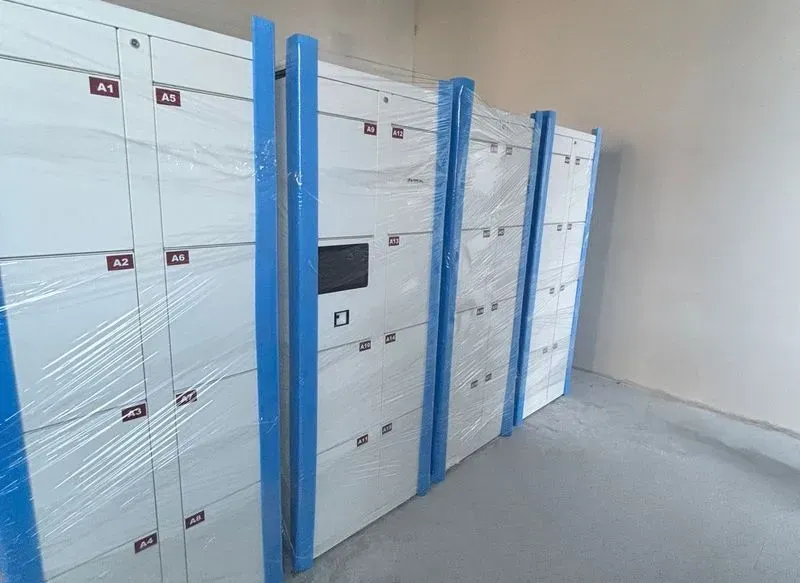
Most of our deployments are phenolic. Phenolic is the right material for the majority of office, hotel, gym and luggage-storage use cases — it is durable, water-resistant, modern-looking, and cost-effective at scale. So when we set out to design a 200-locker installation in Riga last month with our manufacturing partner Setroc, specialists in metallic locker construction, the first conversation we had with the client was about why metal made sense here.
The answer was the use case, not the budget.
A uniform-change site, 24/7
The client in Riga runs a 24/7 operation where staff arrive in their own clothes and change into a work uniform before starting a shift. End of shift, the process reverses. That means each locker sees, at minimum, two open-close cycles per shift per employee, plus interim access if a staff member needs a personal item during their break. With three shifts per day across both locker rooms, daily volume runs into the thousands of operations.
The locker contents are also different from a typical office: full sets of casual clothing left for an entire 9-hour shift, sometimes including shoes, sometimes wet. That is a humid, frequently-disturbed interior environment. Metal — powder-coated, with a ventilated back panel — was the right call here for hygiene, longevity, and the upscale look the client wanted in their staff areas. Setroc's manufacturing quality made the result look like custom furniture, not industrial storage.
Two locker rooms, four control units
The second engineering decision shaped the layout more than the material. We installed two locker rooms (one per gender), and four control units total — two per room.
A control unit is the touchscreen + reader hardware that authenticates a user and tells the right locker door to open. One control unit per locker room is sufficient if traffic is steady. But shift handovers are not steady — they are spikes. Twenty people arriving simultaneously trying to change before a shift starts is a queueing problem, not a capacity problem.
Putting two control units at opposite ends of each locker room split the queue in half during peak windows. The hardware cost was modest; the throughput improvement during the two daily shift-change spikes was not.
Authentication: PIN plus fingerprint
For the user experience, MyLock Cloud gave the operator two parallel authentication methods on every locker:
- PIN code as the default. Easy to onboard a new employee, easy to recover if they forget.
- Fingerprint for staff who opt in. Captured at first use, stored in the on-device secure element. Eliminates the "PIN written on a notepad in the changing room" failure mode.
The split is roughly 60/40 fingerprint over PIN after the first three months, but both methods stay available to every user. No one gets locked out because their fingerprint sensor needs cleaning at 6 AM.
The operational features that actually got used
Three features beyond basic locker access turned out to matter most:
Max-time enforcement at 9 hours. A shift on this site is 8 hours plus overlap; we set the locker session to expire automatically at 9 hours. After that, the locker is flagged in the admin portal as "expired - needs operator action." The operator can extend, force-release, or leave for owner pickup. Before this rule, the cleaning team was the de facto orphaned-locker detection system. Now it is a portal queue.
Already-has-a-locker detection. A surprisingly common confused-user pattern: someone forgets they already have an active locker and tries to claim another. The system catches this and shows them the original assignment instead of issuing a new one. Sounds trivial; saved the operator several "I lost my locker number" support calls per week.
Auto-emailed expiration notices. Five minutes before the 9-hour cutoff, the user gets a notification. The vast majority retrieve their belongings during that window. The minority that do not are why we have the expired-queue feature above. Sequenced correctly, the two features mean almost no involuntary forced-releases.
The operator can flip any of these on or off per locker bank from the admin portal — no support ticket, no config file.
Monthly reports
We send the client a monthly usage report covering the previous 30 days: total openings, peak-hour distribution, average session duration, expiration rates, fingerprint-vs-PIN adoption, and locker utilisation per row. The data is not the point. The point is that the report is the same shape every month, which means month-over-month patterns surface immediately. The client has used these reports to:
- Adjust shift overlap windows after seeing how long the average user actually keeps the locker
- Identify under-used rows in the layout and reassign them to higher-traffic uniforms
- Justify cleaning-schedule changes to leadership with locker-hours-of-use data
API-driven onboarding from their HR system rounds out the loop. New employees arrive with credentials, expired employees lose them automatically. Same playbook we have written about in our Bucharest case study.
The takeaway on material choice
If your site looks like Riga — high-rotation, full-clothing storage, 24/7, premium environment — metal is worth the premium over phenolic. If your site looks like Bucharest — same-clothes-all-day office staff, regular hours, security and access management matter more than long-term-clothing storage — phenolic is almost always the right call.
The choice is not a status decision. It is a function of what is sitting inside the locker for how long.
If you are weighing the material question on a new deployment, book a call — we will walk through your usage profile and recommend a stack.